Website migration — changing a domain, CMS, design, or URL structure — can lead to a loss of organic traffic, rankings, and conversions. To avoid this, migration must be planned not just as a technical release, but as a full-fledged SEO project.
It is especially important to preserve the website’s SEO signals in advance: URL structure, content, internal linking, backlinks, and indexing.
In this guide, you will find a practical checklist for before, during, and after migration to help you move your website without critical SEO losses.
1. What Changes Count as a Website Migration
A website migration is a change to a domain, platform, structure, or technical implementation that can affect crawling, indexing, and SEO signals. Depending on its scale, a migration may apply to the entire website or only specific sections.
Main migration scenarios:
Domain change (site.ua → newsite.ua): moving a website to a new domain address, for example during a rebrand. It requires properly configured page-by-page 301 redirects to pass signals from old URLs to new ones.
Moving to a new CMS: changing the website management platform, such as migrating from WordPress to Shopify or a custom solution. This type of migration may involve changes to URLs, templates, meta tags, internal linking, and page technical structure.
Redesign with URL changes: updating a website in a way that changes page addresses. In this case, you need to map old URLs to new ones and set up the appropriate redirects.
Website structure change: restructuring categories, sections, and URL hierarchy, as well as bulk-deleting or moving pages. Such changes can affect internal linking, indexing, and internal link equity distribution.
HTTP → HTTPS migration: changing the website protocol. You need to set up permanent redirects from HTTP to HTTPS and update internal links, canonicals, and the sitemap.
Subdomain changes: moving content between a subdomain and the main domain, for example blog.site.ua → site.ua/blog. Here, too, it is important to transfer URLs properly and configure redirects.
Merging multiple websites: moving content and URLs from several resources onto a single domain. You need to decide in advance which pages are kept, merged, or removed, and set up the corresponding redirects.
Technical platform change: moving a website to a different framework, server architecture, or technical stack. If this changes URLs, rendering, internal structure, or page accessibility, the migration also requires SEO oversight.
The more changes happen at once — for example, a new domain, CMS, redesign, and new URL structure — the harder it is to control the transfer of SEO signals and identify the cause of a potential drop in organic traffic. Whenever possible, it is better to separate major changes or test them thoroughly before launch.
2. What to Do BEFORE Migration
2.1. Record Current SEO Metrics
Before making any changes, record the current state of the website. Ideally, collect data for at least 6–12 months to account for seasonality and establish a reliable baseline for post-migration comparison.
Key metrics:
Organic traffic: users and sessions from organic search.
Rankings: target keywords and their positions, including the number of queries in the TOP 3, TOP 10, and TOP 50.
Clicks and impressions: data on website visibility in Google.
Indexing: the number and status of indexed pages.
Organic conversions: orders, leads, sign-ups, and other goal completions.
Top organic traffic pages: URLs that generate the most search visits.
Conversion-driving pages: URLs with the highest business value.
Save data separately from core tools:
Google Search Console — queries, clicks, impressions, CTR, positions, and indexing data.
Google Analytics — organic traffic, goal completions, and conversions.
Rank tracking tool — historical rankings for target keywords.
Crawler (for example, Screaming Frog or Netpeak Spider) — technical state and URL structure of the site.
Why it matters: this data will serve as your baseline. After migration, you can compare metrics against the previous period and more quickly pinpoint where changes occurred.
2.2. Collect a Complete List of Old Website URLs
Create as complete a URL inventory of the old website as possible. Do not limit yourself to pages that currently rank well: important URLs may have backlinks, historical traffic, or other SEO value.
Include the following in the list:
pages with organic traffic;
pages with backlinks;
URLs that are currently indexed;
categories and subcategories;
product or service pages;
articles, news, and other content pages;
key landing pages;
all URLs from sitemap.xml;
URLs not in the sitemap that have traffic, links, or other SEO value;
when possible — URLs discovered during crawling and from server logs.
Use multiple sources to build a complete list:
Crawler + Google Analytics + Google Search Console + backlink tools + sitemap + server logs.
Tip: For large websites, collecting URLs manually is impractical. Use a crawler (such as Screaming Frog or Netpeak Spider) and supplement it with analytics, backlink tool, and server log data. This helps uncover URLs that aren’t visible from a single source.
2.3. Run an SEO Audit of the Old Website
Before migrating, record the key SEO and technical parameters of the current site. Check:
H1 — headings and how well they match page structure.
Canonical — canonical URLs and how they are formed.
Robots directives — noindex, nofollow, and other directives if used.
HTTP status codes — 200, 3xx, 4xx, 5xx, and problematic URLs.
Sitemap.xml and robots.txt — freshness and configuration accuracy.
Structured data — presence and validity of structured data.
Internal linking — key connections between pages and sections.
Pagination — structure of paginated pages and their accessibility to search crawlers.
Hreflang — language and regional versions if used.
SEO templates — rules for generating URLs, meta tags, headings, and other SEO elements for dynamic pages.
Such an audit helps you understand which SEO settings need to be carried over to the new site and which issues should be fixed before migration. It also helps prevent losing important SEO signals or carrying old technical errors into the new build.
3. Map Old URLs to New URLs
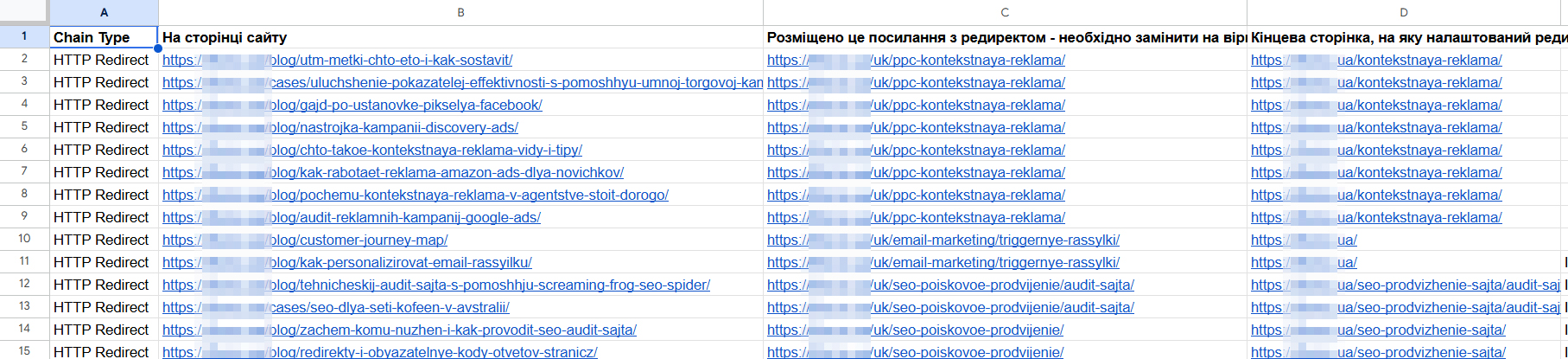
This is one of the most critical stages of migration. For every meaningful old URL, decide in advance what happens next: which new URL it will redirect to, or whether it will be permanently removed.
Create a URL mapping table:
Old URL
New URL
Action
HTTP code
/old-page/
/new-page/
moved
301
/category/old/
/category/new/
moved
301
/obsolete/
—
removed
404/410
Core Rules
One old URL → one most relevant new URL. The target address should be the closest topical equivalent, not just the homepage or a generic page.
Do not redirect all old URLs to the homepage. Mass irrelevant redirects may fail to pass the expected SEO signals.
Avoid redirect chains — sequences like URL A → URL B → URL C. It is better to point the old URL directly to the final destination.
Prevent redirect loops — circular redirects where a URL eventually points back to itself.
Do not leave important URLs unassigned. Pages with organic traffic, backlinks, or other SEO value should have a defined plan.
Do not limit mapping only to pages with traffic. Review the full meaningful URL set compiled in the previous step.
Removed pages don’t need a redirect just for the sake of redirecting. If a URL has no relevant equivalent and the page is truly no longer needed, it can return 404 or 410.
Prepare your URL mapping before launching the new website. This allows developers to implement redirect rules in advance and test them in a staging environment prior to migration.
How to Decide Where to Redirect a URL When the Old Page No Longer Exists
Not every old page will have a direct equivalent on the new site. In such cases, you should not automatically redirect URLs to the homepage or a random page.
Follow this logic:
There is a direct equivalent — set up a 301 redirect to the matching new URL.
The page was merged with another — redirect the old URL to the new page containing the same or closest matching content.
The page was removed, but a relevant section exists — a 301 redirect to that section is acceptable if it genuinely matches the search intent of the old page.
No relevant equivalent exists — do not create an artificial redirect. If the page is truly no longer needed, it can return a 404 or 410 status code.
Example:
/old-product/ → /new-product/ — if the product has been moved.
/old-product/ → /category/ — if the product was removed, but the category remains relevant.
/old-product/ → / — undesirable if the homepage is not a meaningful equivalent to the old page.
Core principle: A 301 redirect should send users and search engines to the page that best matches the content and purpose of the old URL. If no such equivalent exists, it is better to handle the removed URL properly than to create an irrelevant redirect.
4. What to Configure on the New Website
Once the structure and URL mapping are ready, configure and verify the key SEO elements of the new website. Perform the main checks before migration, and repeat them in production after launch.
4.1. 301 Redirects
Set up permanent redirects according to your prepared URL mapping table:
Old URL → New URL
Check:
301 Moved Permanently status code;
absence of redirect chains;
absence of redirect loops;
accuracy of the final destination URL;
alignment of redirects with the prepared URL map.
4.2. Canonical
The rel="canonical" tag helps search engines identify the primary version of a page. After migration, verify that canonicals:
point to the active URL;
use the new domain and proper protocol;
do not reference the old domain or outdated URLs;
do not point to a URL that redirects elsewhere.
Pay special attention to template pages, where a canonical configuration error can affect a large number of URLs.
4.3. Robots.txt
The robots.txt file defines which URLs search crawlers can access. Check:
the new site is not blocked by Disallow: /;
unwanted restrictions were not carried over from staging;
important sections of the site are accessible to crawlers;
an up-to-date Sitemap is specified if needed.
Important: Check robots.txt immediately after launch. Accidentally blocking important sections can prevent them from being crawled and updated in search results.
4.4. Noindex and Meta Robots
Check meta robots and X-Robots-Tag directives so that noindex is not accidentally left on important pages during migration.
Make sure that:
pages that should be indexed do not contain noindex;
X-Robots-Tag does not block indexing of required pages;
noindex is used only where intended by the site’s SEO logic;
template settings do not add noindex to a large number of pages.
Important: robots.txt and noindex serve different functions. robots.txt controls crawling, while noindex tells search engines not to include a page in the index.
4.5. Sitemap.xml
Create an up-to-date XML sitemap with the new website’s URLs. Ideally, include only pages that:
Update internal linking to match the new website structure. Check links in:
main menu and navigation;
breadcrumbs;
categories and subcategories;
articles, news, and blogs;
recommendation blocks;
footer;
automated and manual internal linking.
Internal links should point directly to final URLs rather than going through 301 redirects. This simplifies site crawling and helps search engines discover active pages faster.
5. What NOT to Change at the Same Time as Migration
Unless there is a critical business need, avoid making major changes to other key SEO factors at the same time as a technical migration. This helps reduce the number of variables that could affect organic traffic and makes it easier to diagnose potential issues after launch.
Whenever possible, avoid changing simultaneously:
Website structure: a global overhaul of section hierarchy, nesting depth, and navigation logic.
URLs: mass changes to page addresses without a clear need and a pre-built redirect map.
Content: large-scale rewriting, trimming, or removal of content on key pages.
Title and H1: simultaneous changes to templates and generation logic for meta tags and headings.
Internal linking: radical changes to page relationships and navigation.
Page count: mass deletion or large-scale creation of new pages.
Categories: simultaneous merging, renaming, or splitting of core commercial categories.
Language versions: adding new languages or significantly changing language structure at the same time as changing the domain or platform.
The more large-scale changes you roll out in parallel, the harder it will be to identify the cause of potential shifts in organic traffic, rankings, or indexing after launch. Separating migration from other major SEO changes over time makes results easier to control and analyze.
6. Pre-Launch Checklist
Use this checklist right before moving the new website to production to verify core SEO, technical, and analytics settings.
SEO
Full list of old URLs (URL inventory) is saved.
Baseline for organic traffic, rankings, and key SEO metrics is recorded.
Mapping table of old to new URLs (URL mapping) is created.
Permanent 301 redirects are configured for changed URLs.
Canonicals are checked on key pages.
robots.txt content and rules are reviewed.
Up-to-date sitemap.xml is created.
Title and Description meta tags and their templates are checked.
Structured Data is verified.
Hreflang is checked if the site has language or regional versions.
Technical
Key pages that must be accessible to users and search crawlers return a proper 200 OK status.
Pages that should be indexed do not have an accidental noindex.
robots.txt does not block crawling of the site or important sections.
HTTPS works properly and the SSL/TLS certificate is valid.
All planned redirects are tested and point to the right final URLs.
There are no unnecessary redirect chains or loops.
Important URLs do not have unexpected 4xx or 5xx errors.
Removed pages without a new equivalent properly return 404 or 410 if specified in the migration plan.
Analytics and Monitoring
Google Analytics 4 is installed and verified on the new site.
The new property is added and configured in Google Search Console.
Conversion tracking and key goal completions are verified.
Core events (forms, clicks, calls, etc.) are properly sent to analytics.
Required access permissions for analytics, ad platforms, and other tools are checked.
A method for monitoring organic traffic, indexing, and errors post-launch is prepared.
7. Launch Day: What to Check Immediately After Migration
Immediately after switching the site to production, run a quick check of critical elements. The goal is to catch technical errors as early as possible before they affect crawling, indexing, traffic, or core site functionality.
What to Check First
Homepage: availability, proper loading of content, CSS, and JavaScript, and absence of critical errors.
Main categories and sections: functionality of the main menu, navigation, filters, and key structural elements.
Highest-revenue pages: performance of commercial URLs that matter most to the business.
Top organic traffic URLs: spot-check pages that previously brought in the most organic visits.
Key landing pages: check landing pages used for SEO, ads, or other marketing campaigns.
robots.txt: make sure the file is accessible and does not block crawling of important sections.
sitemap.xml: verify that an up-to-date sitemap is accessible on the new site, its URLs are valid, and there are no technical errors.
canonical: ensure key pages point to the active canonical URLs of the new site.
Redirects: spot-check old URLs from your prepared redirect map and make sure they point to the right new addresses.
HTTP status codes: key pages on the new site should return 200 OK, while changed old URLs should return the planned status, usually 301. Removed pages without a relevant replacement can return 404 or 410.
Check Critical Factors Separately
Whether old-to-new domain redirects work: if the domain changed, verify that old URLs redirect properly to matching pages on the new domain rather than redirecting in bulk to the homepage.
Whether the new site is accessible to Google: use the URL Inspection tool in Google Search Console to check accessibility and crawlability of key pages.
Whether there is no global noindex: make sure staging or test settings blocking indexing for the whole site or key sections were not left on production.
Whether analytics works: verify data flow into Google Analytics 4 and tracking of core events and conversions.
Whether important pages are missing: compare key sections and URLs against the old site to catch accidentally removed or inaccessible pages.
Whether indexing logic is consistent: check robots.txt, noindex, canonical, and sitemap together so the new site doesn’t send conflicting signals to search engines.
8. Google Search Console After Migration
After launching the new website, Google Search Console becomes one of the primary tools for monitoring the migration. Here you can track how Google crawls new URLs, which pages enter the index, and whether issues arise with availability, redirects, or indexing.
Checking Indexing and Technical Reports
In the first days and weeks after migration, regularly check key GSC sections:
Page Indexing: Monitor the trend of indexed and non-indexed URLs and reasons why pages are excluded from the index. Not all non-indexed URLs are a problem: for example, 404s for intentionally removed pages, duplicates, or pages with noindex can be normal. Focus specifically on unexpected changes and errors.
URL Inspection: Check the most important pages — the homepage, key categories, commercial pages, and other high-value URLs. The tool shows whether Google can crawl the page, whether indexing is allowed, which canonical is selected, and when Google last crawled the page. When needed, run a live test and request re-indexing.
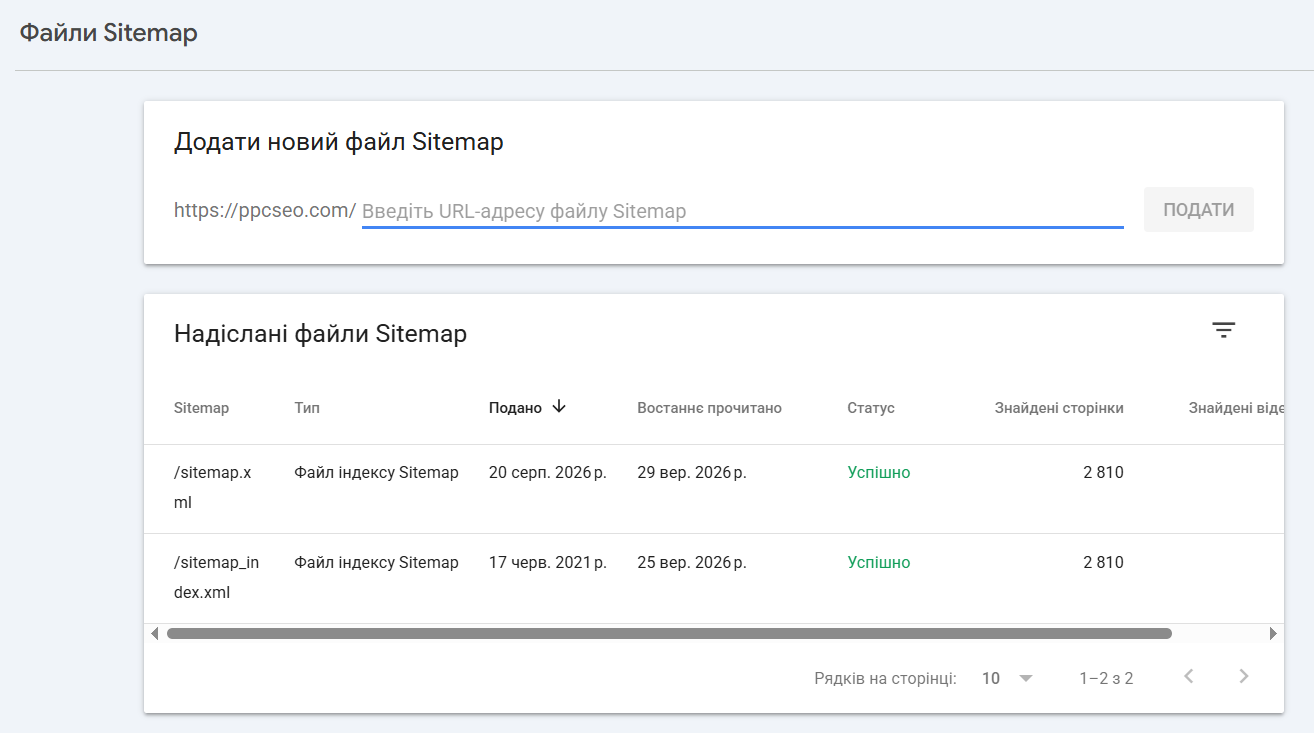
Sitemaps: Right after launch, submit the new site’s up-to-date sitemap.xml in GSC and verify that Google read it successfully. Going forward, monitor sitemap status and ensure its URLs match the actual structure of the new site.
Crawl Stats: Use this report to monitor Googlebot activity, including request volume, server response types, and crawl issues. Evaluate activity changes after migration in context with other data rather than treating them alone as proof of a successful move.
If Changing Domains: The "Change of Address" Tool
If the migration involves moving from an old domain to a new one (site.ua → newsite.ua), once redirects are set up and verified, you can use the Change of Address tool in Google Search Console. It notifies Google of the move and helps transfer signals from the old site to the new one.
Before using the tool:
Add and verify ownership of both the old and new websites in Google Search Console.
Make sure old URLs redirect properly to matching URLs on the new domain using permanent redirects.
Open Change of Address in the old website’s property.
Select the new website and pass the automated checks.
After launching the migration, continue monitoring both the old and new sites in GSC.
This tool is designed for moving a site between domains or subdomains. It is not used for URL changes within the same domain, nor is it needed for moving from HTTP to HTTPS.
Important: Change of Address does not replace 301 redirects. Google recommends setting up and testing redirects first, and only then notifying Google of the move via Search Console. Keep redirects from old URLs in place for at least 180 days — or longer if the old site continues receiving traffic from Google.
What Else to Check in GSC After Migration
Old property: do not remove it right after migration. It is needed to monitor old URLs, redirects, and search traffic shifts. For migrations using Change of Address, Google recommends keeping redirects active for at least 180 days.
New property: check whether impressions, clicks, and search queries start appearing for the new domain. Search Console data doesn’t appear instantaneously, so evaluate results over time.
Indexing errors: watch for Soft 404, Redirect error, unexpected 404s, 5xx errors, robots.txt blocks, and noindex. A 404 by itself isn’t necessarily an issue — what matters is whether it affects a URL that should have been moved or remained accessible.
Important URL status: check key landing pages via URL Inspection. For pages meant to be indexed, make sure Google can crawl them, they are eligible for indexing, and the right canonical is set.
9. How to Monitor Traffic After Migration
Temporary fluctuations in organic traffic, rankings, and indexing are possible after migration. Do not draw conclusions based only on the first few hours after launch. Search engines need time to recrawl pages, process redirects, and update data in the search index.
Break monitoring into several time stages for systematic control.
First 24–72 Hours: Immediate Technical Monitoring
During this period, focus primarily on site availability and absence of critical errors:
Site availability: check whether the site and key pages open for users and search crawlers.
4xx / 5xx errors: monitor server logs and other data sources to catch widespread errors.
Redirects: verify that 301s for old URLs work properly and there are no chains or loops.
Crawl activity: analyze whether search bots have started crawling new URLs.
Indexing: check key pages in Google Search Console and track early indexing changes.
Organic traffic: monitor for any sharp or complete drop in organic sessions.
Week One: Initial SEO Trend Assessment
Once technical stability is confirmed, move on to analyzing search metrics:
Rankings: track changes across core keyword groups.
Clicks and impressions: analyze Clicks and Impressions trends in Google Search Console.
Pages with major traffic drops: identify URLs that lost the most organic visits and check the causes.
New 404s: look for accidentally missed redirects, broken internal links, and other causes of unexpected 404s.
Indexing issues: check new statuses and excluded pages in the Page Indexing report.
Organic landing pages: compare traffic and metrics for key URLs against pre-migration values.
Weeks 2–4: Stabilization and Results Evaluation
At this stage, you can evaluate the longer-term trend of the migration:
Organic traffic: compare metrics against your baseline, accounting for seasonality and a comparable pre-migration period where possible.
Indexing: check whether new URLs enter the index steadily and old URLs are handled according to the migration plan.
Backlinks: check important external links and verify redirects from old URLs to new ones.
Search visibility: analyze shifts in impressions, clicks, and rankings for core query groups.
Organic conversions: evaluate orders, leads, calls, and other goal actions from organic traffic.
Pages with the biggest losses or gains: analyze URLs that had the largest impact on overall migration performance separately.
Important: Do not judge migration success by total traffic alone. If metrics shift, analyze them at the level of individual URLs, categories, page types, and query groups. This helps pinpoint where an issue occurred or where growth emerged.
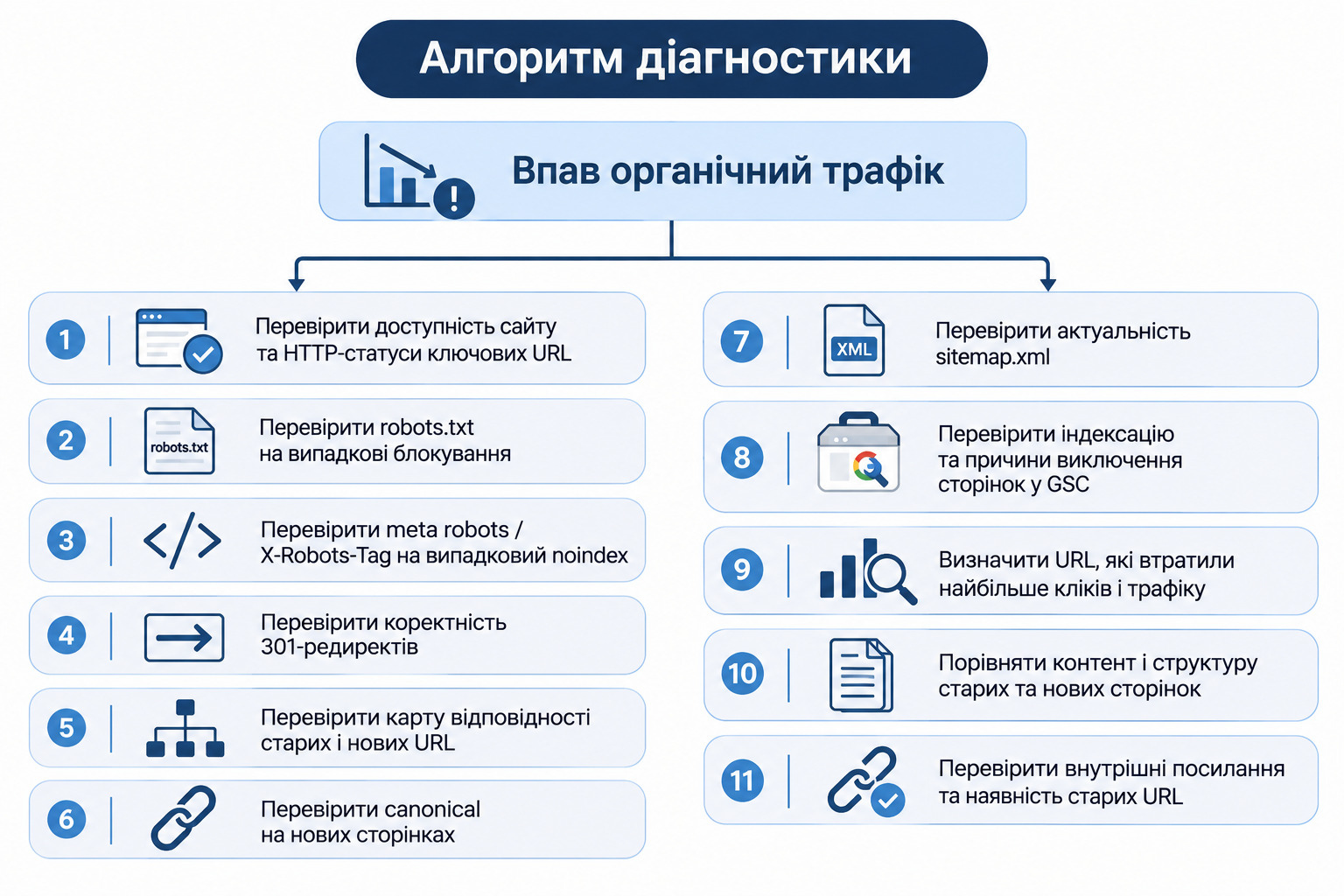
10. What to Do If Traffic Drops After Migration
A drop in organic traffic after migration does not always mean a critical problem: some fluctuations are normal while search engines recrawl pages and refresh index data. However, if the drop is significant or persists, check technical and SEO signals step by step.
Common Migration Mistakes
When diagnostics uncover an issue, it is most often tied to one of these mistakes:
All URLs redirect to the homepage: bulk redirecting instead of page-by-page mapping. If the target page does not match the content and search intent of the old URL, the redirect can be ineffective and in some cases cause Google to treat the destination as a soft 404.
Redirect points to an irrelevant page: for example, redirecting a category page to an informational article that is not a meaningful equivalent.
New site is blocked from crawling or indexing: noindex accidentally left on production, an incorrect X-Robots-Tag, or important sections blocked in robots.txt.
Canonical still points to the old domain: pages on the new site set old URLs as canonical, sending the wrong signal about the primary page version.
Sitemap contains old or outdated URLs: old site URLs, redirects, 404s, or other non-indexable/non-primary addresses remain in the sitemap.
Internal links point to old URLs: menus, breadcrumbs, footer, or body links still use old addresses, creating extra redirects and complicating crawling of the new site.
Some pages were not migrated: entire sections, categories, products, services, or other important URLs were accidentally left behind.
URLs changed without redirects: new addresses were created, but 301s were not set up for old URLs, causing old pages to return 404 instead of redirecting to relevant equivalents.
Traffic-generating content was removed: copy, blocks, categories, or other elements that previously drove search visibility were removed during redesign or restructuring.
Internal site structure changed: important pages became buried deeper, lost internal links, or became unreachable from main navigation.
Important: Do not try to fix everything at once. Check critical technical blockers first — availability, HTTP status codes, robots.txt, noindex, and redirects. Then move on to canonicals, sitemap, internal linking, content, and site structure changes. This order helps isolate the cause of a drop faster.
11. What to Do With the Old Website After Migration
Work on the old domain does not end when the new site launches. Old URLs must continue to be handled properly so users, search crawlers, and backlinks can reach the corresponding pages on the new website.
Core Rules for Handling the Old Domain
Do not shut down the old domain immediately: keep the old domain and server configuration live as long as needed for redirects to work. For domain migrations, Google recommends keeping redirects in place for at least 180 days, and longer for important URLs.
Maintain 301 redirects: redirects from old URLs to matching new pages should work reliably throughout the migration period. Do not remove them just because most traffic has already shifted to the new domain.
Monitor old URLs: regularly check for redirect issues, unavailable old pages, or other errors. For domain migrations, keep monitoring the old property in Google Search Console.
Audit backlinks: identify valuable backlinks still pointing to old URLs. This helps show which pages carry strong external signals and where links should be updated.
Update key backlinks where possible: if you can reach out to partners, directories, media outlets, or authors, ask them to replace old URLs with active URLs on the new site. This doesn’t replace redirects, but gradually moves links directly to new URLs.
Track both old and new URLs: monitor indexing, traffic, and page statuses in GSC and analytics. You don’t need to wait for old URLs to disappear completely from the index — what matters most is that migrated pages on the new site are crawled and indexed properly.
Do not keep the old site as a separate version: after migration, don’t leave old content accessible in parallel at old URLs if it is meant to be replaced by new pages. Old URLs should either redirect to matching new ones or return a proper 404/410 if removed without a relevant replacement.
The old domain and 301 redirects matter beyond launch day. They bridge old URLs to new ones and help prevent losing users and SEO signals while the site settles after migration. For important URLs, keeping redirects longer than the minimum recommended period makes sense if they still receive traffic or backlinks.
12. Complete SEO Migration Checklist
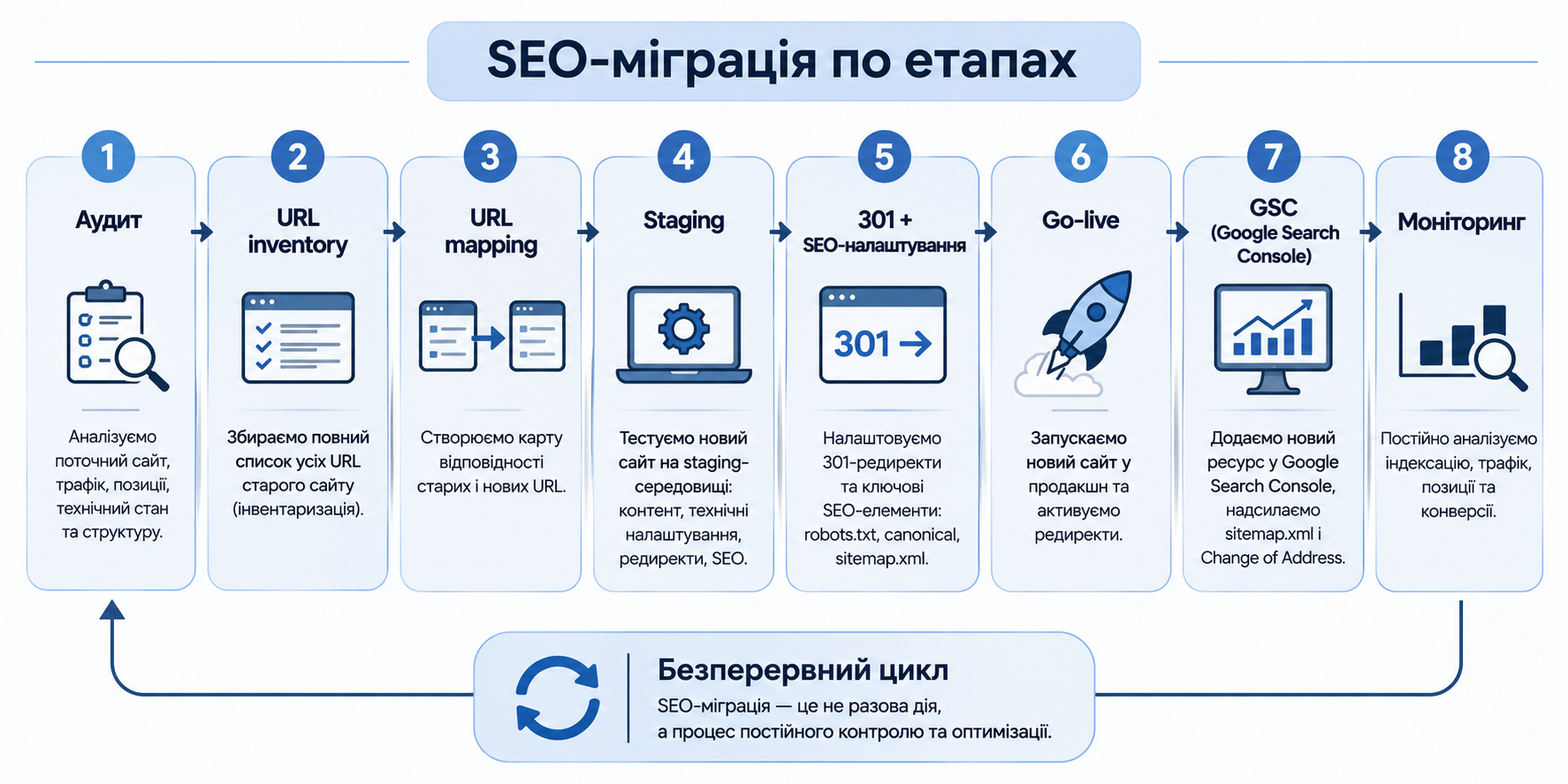
Use this step-by-step checklist when planning and executing a website migration. It helps you move systematically through all core stages — from preparation to post-launch monitoring.
Phase 1. Before Migration — Preparation
Collect URLs: build a complete inventory of old addresses (URL inventory).
Record SEO metrics: save a baseline of organic traffic, rankings, clicks, impressions, and conversions.
Crawl the old site: run a crawl using a crawler and record technical status and URL structure.
Prepare URL mapping: create a detailed table mapping old URLs to new URLs.
Prepare 301 redirects: configure redirect rules according to the URL mapping and test them.
Test the new site on staging: test structure, content, indexing directives, canonicals, sitemap, internal links, and core functionality.
Prepare sitemap.xml: generate an up-to-date sitemap for the new site.
Prepare analytics: verify GA4 setup, events, and conversions on the new platform.
Phase 2. During Launch — Release
Open the site for crawling and indexing: remove test noindex and Disallow rules that should no longer apply in production.
Activate 301 redirects: enable page-by-page redirects from old URLs to matching new ones.
Check sitemap.xml: verify that the current sitemap is accessible at the new address and contains valid URLs.
Check robots.txt: make sure it does not block the site or important sections.
Check canonicals: verify that key pages reference current canonical URLs.
Check analytics: ensure GA4, events, and conversions are firing properly.
Check key URLs: test the homepage, main categories, commercial pages, and top organic traffic URLs.
Check HTTP status codes: verify that key new pages return 200 OK and old URLs are handled according to the migration plan.
Phase 3. After Launch — Monitoring
Check Google Search Console: add and verify the new property, check Page Indexing, and submit the current sitemap.xml.
Use Change of Address: complete the process in GSC if the migration involves a domain change.
Monitor indexing: track how Google crawls and indexes new pages.
Monitor 4xx / 5xx: regularly check server logs and GSC reports for unexpected errors.
Monitor redirects: check old URLs for proper redirects and absence of chains and loops.
Monitor organic traffic: track trends and compare them against your baseline.
Check rankings: analyze ranking shifts across core keyword groups.
Check conversions: monitor orders, leads, calls, and other goal actions from organic traffic.
Analyze pages with drops: identify URLs that lost the most traffic and investigate potential causes.
Monitor the old domain: keep redirects active and watch old URLs throughout the post-migration period.
Conclusion
Migrating a website without critical organic traffic losses comes down to a controlled transfer of structure, URLs, and core SEO signals from the old site to the new one. To achieve this, it is essential to run a URL inventory in advance, prepare a mapping table, set up 301 redirects, and verify the new site’s indexing settings.
It is equally important to monitor results after launch: check availability and crawling, robots.txt, noindex, canonicals, sitemap.xml, internal links, indexing, and organic traffic trends.
The better prepared a migration is before launch, the easier it is to preserve organic traffic and quickly spot issues if they arise after release.