
For a local business, it is crucial to be visible at the exact moment a potential customer searches for a specific service in their city or neighborhood. For instance, when people search for “dentist near me,” “auto repair in Kyiv,” or “beauty salon Lviv,” they are often ready to book an appointment, call, or place an order.
Google Ads helps display ads to these users and attract potential clients in your target area. To achieve this, you need to properly set up location targeting, select the right keywords, create relevant ad copy, configure conversion tracking, and monitor lead quality.
In this guide, we will explore which campaign types work best for local businesses, how to set up your ads, calculate a budget, and measure your results.
Google Ads is an advertising platform that enables businesses to display ads based on search queries, user location, and other intent signals. For a local company, it provides a direct way to reach people searching for products or services within a specific city, neighborhood, or nearby radius.
For example, a dental clinic can advertise dental implants in Lviv, while an auto repair shop can promote suspension repair in Dnipro. Geographic targeting allows you to restrict ad impressions strictly to the areas your business serves.
The effectiveness of local advertising depends on:
Unlike local SEO, which builds organic visibility in Search and on Google Maps, Google Ads provides paid ad placements. However, simply launching a campaign does not guarantee sales: it is essential to track not only clicks, but also form submissions, phone calls, bookings, and actual customers.
Choosing the right campaign type depends on how customers search for your service and what specific action you want them to take.
2.1. Search Campaigns
Search advertising is ideal for companies looking to capture users with a clear intent to book a service or buy a product.
Example queries:
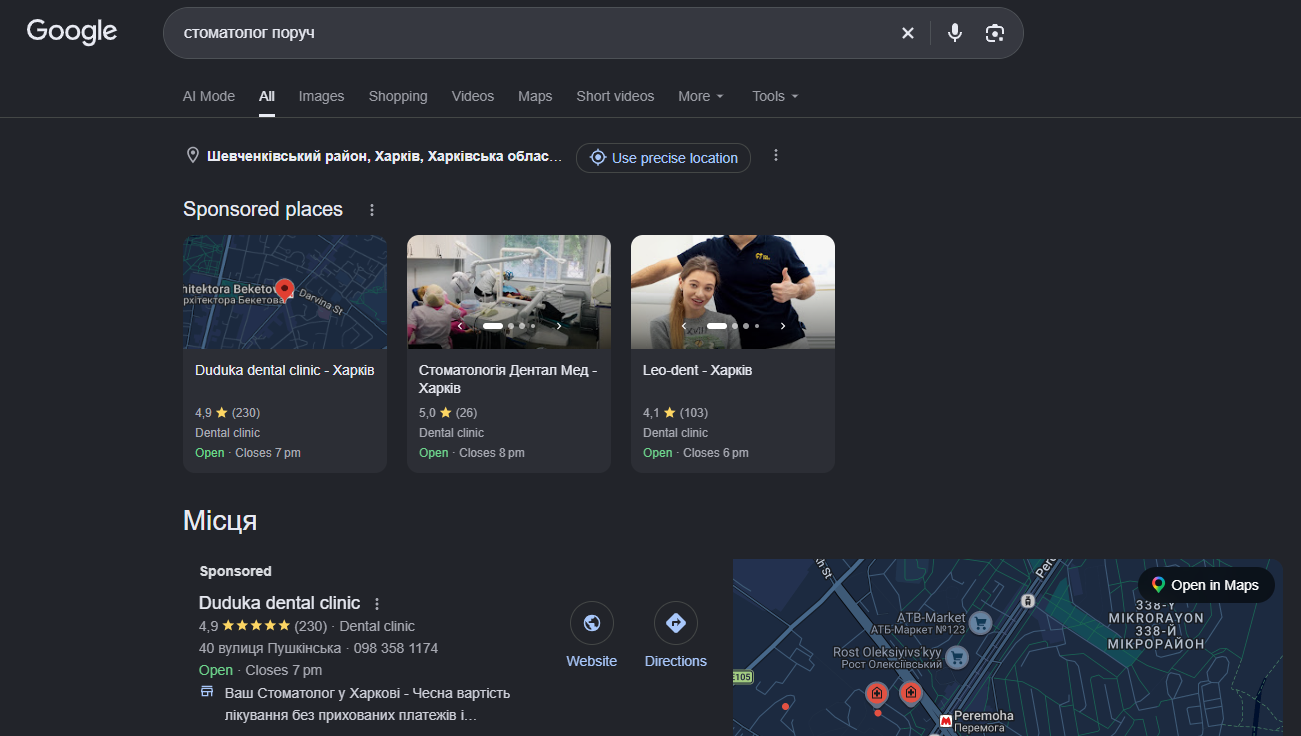
Best for: clinics, beauty salons, auto repair shops, law firms, repair workshops, and other local service providers.
2.2. Performance Max
Performance Max leverages Google’s automation to serve ads across multiple Google channels and inventory—including Search, YouTube, Gmail, Display, and Maps—depending on the campaign setup and available ad inventory.
These campaigns can help expand your reach and drive leads, calls, or sales. To ensure strong performance, you must configure accurate conversion tracking, supply high-quality creative assets, and define goals aligned with your business objectives.
For businesses with physical storefronts, Performance Max can optimize for local actions such as phone calls and direction requests. Eligible accounts can also access goals tied to store visits and in-store sales. Availability depends on Google’s account requirements, so check which goals are unlocked in your ad account before launching. Google recommends having at least 5 locations for campaigns with local actions and 10 locations for campaigns optimized for store visits or in-store sales. Learn more about Performance Max requirements for local goals.
Best for: businesses looking to expand reach and scale customer acquisition that already have sufficient conversion data for campaign optimization. Local retailers with multiple locations should separately verify eligibility for store visit and in-store sales goals.
2.3. Campaigns for Leads and Phone Calls
For local service providers, getting a direct inquiry is often far more valuable than a simple website visit. You can achieve this using Search campaigns with lead-focused conversion goals, lead form assets (where eligible), and call assets.
For instance, a user might call a service center to ask for a repair quote or submit a consultation request at a clinic.
Track not just the raw volume of calls and form fills, but how many of them convert into qualified leads and paying customers.
Best for: clinics, repair services, law firms, and businesses where the sales process begins with a consultation.
Important: Google retired the ability to create new call-only ads in February 2026, and existing call-only ads will stop serving impressions in February 2027. For all new campaigns, use Responsive Search Ads (RSAs) paired with call assets.
2.4. Advertising on Google Maps
Ads can appear on Google Maps through compatible campaign types and formats, depending on your campaign settings and available ad features. If your business operates from a physical location, verify your Google Business Profile details and link the profile to your Google Ads account when required by the campaign type.
Prepare your Google Business Profile: double-check your address, phone number, business hours, categories, service list, and photos. Depending on the campaign and available features, you can link this profile directly to your ad account.
Keep in mind that having a completed profile does not automatically guarantee paid placements on Maps, nor is organic presence in local search results the same as paid advertising.
Best for: restaurants, coffee shops, retail stores, beauty salons, clinics, and other brick-and-mortar businesses.
For most local service businesses, it makes sense to start with Search campaigns and reliable lead tracking, adding other campaign types later based on performance and business goals.
Before launching ads, make sure your business is ready to handle incoming inquiries.
Whenever possible, set up tracking to pass data on qualified leads and actual sales back into Google Ads. This allows you to evaluate campaigns based on real business revenue rather than raw inquiry volume.
4.1. Define Your Location Targeting
Select the territory your business can realistically serve. A beauty salon might only need a few nearby neighborhoods, whereas a delivery service or specialized clinic can cover an entire city and its surrounding suburbs.
In Google Ads, you can set geographic targeting by country, city, specific area, or a radius around a particular pin. Available targeting options depend on the campaign type. Learn more about geographic targeting in Google Ads.
Check user location settings. Under default settings in many campaign types, ads can be shown not only to people who are physically in or regularly visit your selected region, but also to those who show interest in it. If your business serves local customers exclusively, check whether you should restrict impressions strictly to people physically located within your target area. The availability of this option depends on the campaign type.
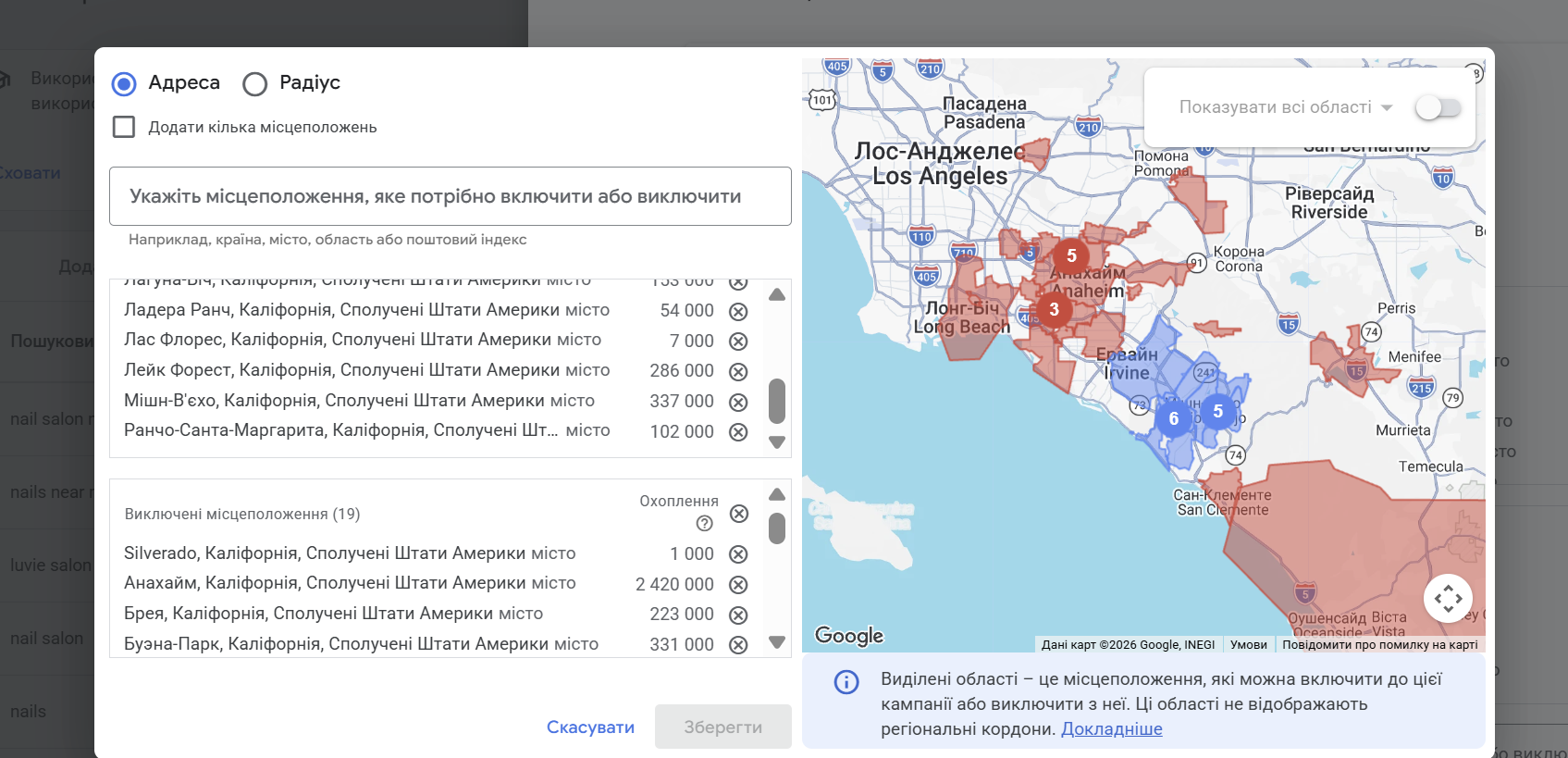
This clearly illustrates working with locations by selecting specific cities or service radii. The main value of this tool is the ability not only to include target neighborhoods, but also to exclude irrelevant neighboring areas (such as major nearby metro areas where your business doesn’t operate), protecting your budget from wasted clicks.

Selecting the "Presence" option highlights a setting that is critical for local businesses. Choosing "Presence: People in or regularly in your included locations" (instead of Google’s default recommendation, "Presence or interest") filters out users from other cities or countries who are merely researching information about the region.
If your company has branches in multiple cities, consider creating separate campaigns or a clean account structure that lets you control budgets and measure performance for each location individually.
Keep in mind that Google determines user location using various signals, so geo-targeting does not guarantee 100% precision. Regularly review geographic performance reports and adjust your settings if your ads receive irrelevant clicks from specific districts or towns.
4.2. Gather Local Keywords
Select keywords that reflect your service, location, and user intent. For example, a dental clinic might organize keywords into the following groups:
Not every keyword needs to contain a city name: Google takes the user’s physical location and other contextual signals into account. Therefore, monitor actual search queries closely once your campaign goes live.
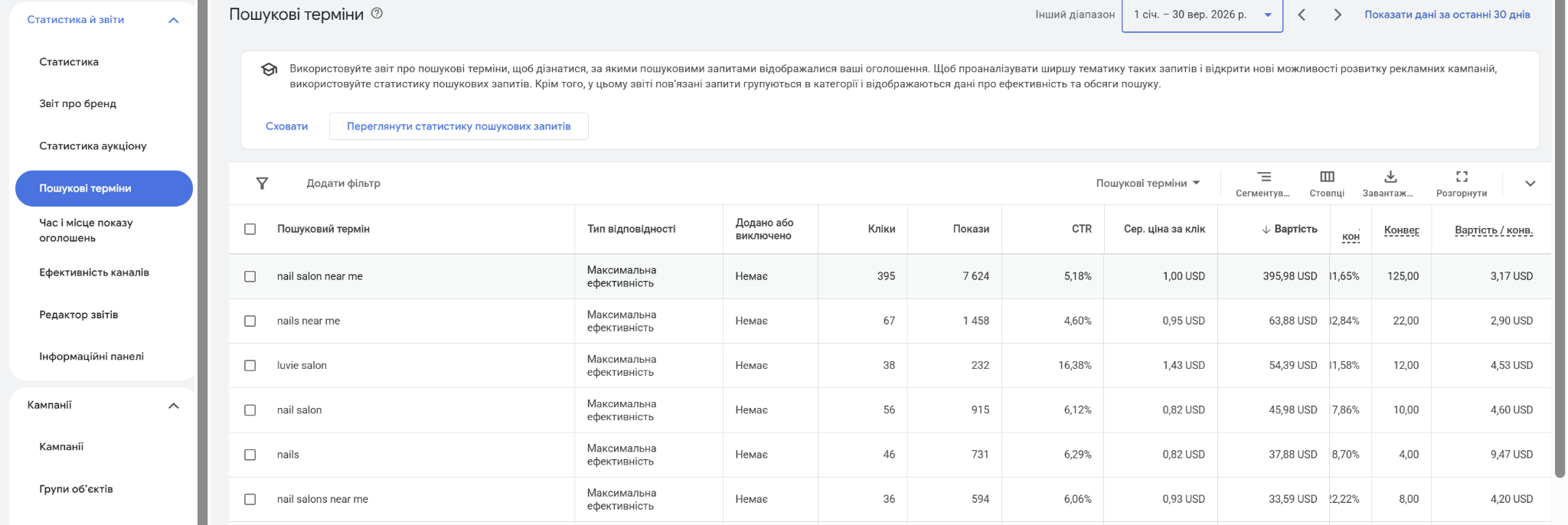
Monitoring via the "Search terms" report demonstrates how to verify geographic accuracy in practice. The report reveals actual user queries (such as searches including local modifiers like "near me" or specific brand names). If you spot queries containing cities your business does not serve, add them to your negative keyword list immediately.
When setting up keywords, pay attention to match types:
Add negative keywords to block irrelevant traffic. For example, if your company does not offer free services, exclude terms like "free" once search term data confirms they fail to bring in qualified leads. Update your negative keyword list regularly based on the Search Terms report.
4.3. Create Ads Highlighting Local Advantages
Your ad copy should match the search query and clearly explain why a customer should choose your company over competitors.
When writing your ads:
Search Ad Example
Auto Repair in Kharkiv | Book Your Service Today
Vehicle diagnostics and repair. Check available appointment slots and service terms. Request a callback online or call us now.
This is a sample ad: copy, URLs, and ad assets must be tailored to your actual business. Avoid stuffing the city name into every single headline just for the sake of localization—relevance and genuine value propositions matter far more.
4.4. Configure Conversions and Analytics
Clicks and impressions alone don’t tell you how many people actually became customers. Set up conversion tracking for key actions:
You can track these using the Google Ads tag, Google Analytics 4 (GA4), and cross-platform conversion imports. Double-check that events fire accurately and that a single user action isn’t counted multiple times.
Separate primary and secondary conversions. Primary actions—the ones your campaign optimizes bidding for—must align directly with real business goals. Secondary actions (such as page views or clicks on a contact button), when they do not yet represent an actual lead, are useful for behavioral analysis but should generally not be used for bid optimization.
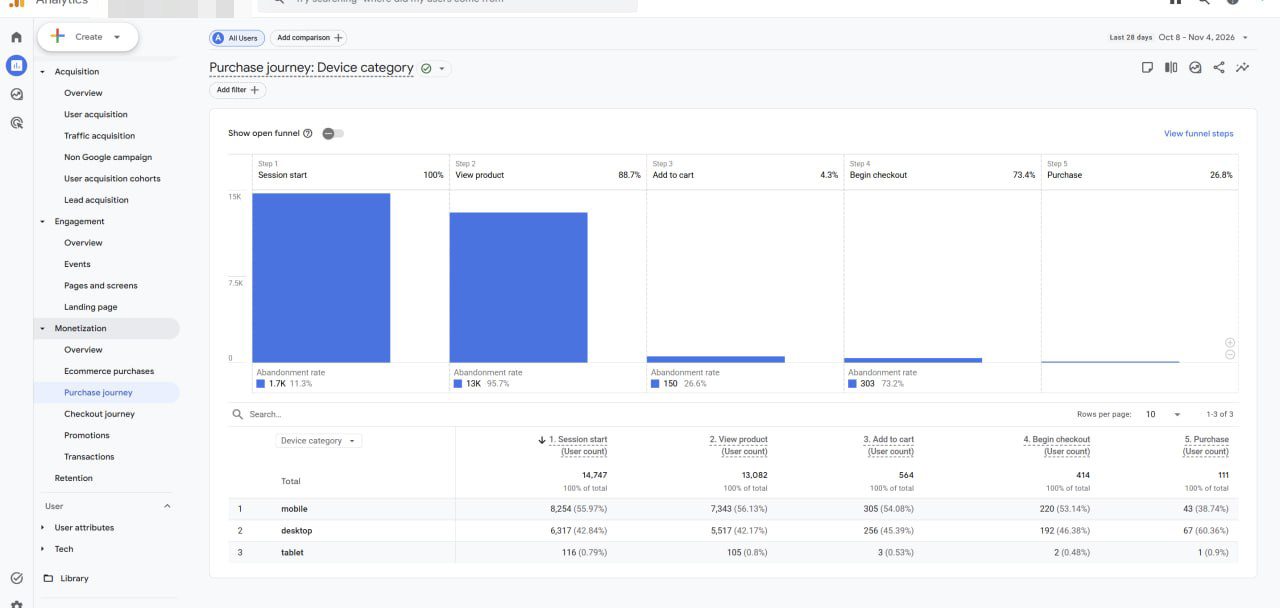
Funnel stage analysis uncovers real drop-offs in sales that standard click metrics miss:
Tracking the full customer journey helps pinpoint weak spots on your website and mobile checkout flow, preventing you from wasting ad spend on a broken funnel.
Whenever possible, feed data on qualified leads, confirmed appointments, and closed sales back into Google Ads via your CRM or other offline conversion import methods. This lets you optimize not just for lead volume, but for true revenue value.
4.5. Choose Your Budget and Bidding Strategy
Your budget depends on local demand, competition, cost-per-click (CPC), and your unit economics. To establish a baseline, use Google Ads Keyword Planner to estimate search volume and determine how many qualified leads you need to generate.
Choosing a bidding strategy depends on your goals and available conversion data:
Avoid setting overly restrictive tCPA or tROAS targets before collecting sufficient, reliable conversion data—doing so can choke impressions and stall lead volume. First verify your tracking, gather baseline performance data, and adjust targets gradually.
Evaluate your budget not only based on what your company can afford, but also against available search demand and your maximum acceptable customer acquisition cost (CAC).
Once your campaigns are live, regularly analyze performance and fine-tune your settings. Key areas for optimization include:
Avoid jumping to conclusions based on just a handful of clicks or leads. Evaluate campaign changes in the context of statistical volume, your sales cycle length, and seasonal trends.
To evaluate Google Ads properly, track a set of metrics that reflect the full customer journey from initial click to closed sale. Click and lead counts are important, but on their own they don’t show how effectively your ads generate actual paying customers.
| Metric | What It Measures |
| Clicks & CTR | Total ad clicks and the percentage of impressions that resulted in a click |
| Conversions | Total recorded target actions: form fills, phone calls, bookings, or purchases |
| Conversion Rate (CVR) | The percentage of clicks that resulted in a conversion |
| Cost Per Action (CPA) | Average ad spend per recorded conversion |
| Qualified Lead Rate | The share of inquiries that meet your ideal customer criteria |
| Customer Acquisition Cost (CAC) | Ad spend required to acquire one new paying customer who actually purchased a product or service |
| Revenue & ROAS | Revenue generated from ads compared to ad spend, provided conversion values are tracked accurately |
Cost per conversion (CPA) and customer acquisition cost (CAC) are two different metrics. For example, your ads might generate inquiries at 400 UAH each, but not every inquiry turns into a sale. To measure true profitability, track not only the cost per lead, but also the actual cost to acquire a paying customer.
Key Metrics by Local Business Type
Why Call and Lead Volume Doesn’t Equal Customer Count
A phone call might simply be a price check, an out-of-area inquiry, or a repeat contact from an existing client. Likewise, not every form submission converts into a booked appointment or purchase.
Therefore, match your Google Ads data with your CRM or sales ledger whenever possible. Track which inquiries turned into qualified leads, how many closed into sales, and how much revenue they generated. This reveals which campaigns bring in real paying customers rather than empty inquiry volume.
Many local projects run into these exact setup pitfalls. See how we resolved them in our Google Ads case studies.
Advertising costs depend on local competition, city size, industry niche, search demand, seasonality, and landing page quality. There is no single universal budget that works equally well for a dental clinic, a beauty salon, and an auto repair shop.
How to Estimate CPC, Cost Per Lead, and Ad Budget
For an initial estimate, use Google Ads Keyword Planner. It helps forecast search demand and estimated bid ranges, though actual cost-per-click (CPC) after launch may vary.
You can estimate your approximate cost per lead using this formula:
Cost Per Lead (CPL) = Average CPC ÷ Conversion Rate
For example, if an average click costs 20 UAH and 5% of visitors submit a form, you need an average of 20 clicks to generate one lead. Your estimated cost per lead would be:
20 UAH ÷ 5% = 400 UAH.
This is a baseline projection under specific assumptions, not a guaranteed outcome. Actual costs depend on traffic quality, campaign settings, your offer, and landing page conversion rates.
How to Calculate Your Budget Based on Business Goals
Suppose your company wants to acquire 20 new customers per month. If 40% of leads convert into paying customers, you need roughly 50 leads. At a projected cost of 400 UAH per lead, your budget calculation looks like this:
| Metric | Sample Value |
| Target new customers per month | 20 |
| Lead-to-customer conversion rate | 40% |
| Required number of leads | 50 |
| Projected cost per lead | 400 UAH |
| Estimated monthly ad budget | 20,000 UAH/month |
All figures in this example are illustrative. Spending 20,000 UAH does not guarantee 20 customers: actual results depend on real-world CPL, lead quality, and your sales close rate. Before launching, also verify whether local search volume in your region is large enough to support your target lead count.
When planning your marketing budget, separate your expenses into three categories:
An optimal budget isn’t the maximum amount a company can afford to spend—it is a realistic level of investment capable of acquiring qualified customers at a profitable unit cost.
Both Google Ads and local SEO attract customers from Google Search, but they serve different strategic roles. Paid search delivers immediate traffic right after launch, provided there is search demand and your ads win auctions. Local SEO focuses on steadily building organic visibility for your website and Google Business Profile on Search and Maps.
| Criterion | Google Ads | Local SEO |
| Speed to results | Can drive clicks immediately upon launch if demand exists | Results typically build gradually over time |
| Costs | Direct ad spend plus optional management fees | Resources for site optimization, content, and profile management |
| Control | Direct control over budget, geo-targeting, keywords, and bids within platform rules | No direct control over organic rankings |
| Longevity | Paid visibility stops the moment you pause the campaign | Organic rankings can persist long-term, though they require ongoing maintenance |
| Primary role | Capturing immediate demand, testing offers, and promoting specific services | Building sustainable, long-term organic presence |
When to Choose Google Ads
Paid advertising is especially effective when:
For example, a newly opened auto repair shop can launch Search ads targeting car diagnostics or tire replacement in its neighborhood, capturing high-intent users immediately.
At the same time, Google Ads does not guarantee sales: outcomes still rely on market demand, competition, campaign structure, offer strength, and website usability.
Invest in local SEO if your goal is sustainable, long-term visibility in local Search and Maps. Core focus areas include:
While a well-optimized Google Business Profile helps customers discover your business, completing it does not guarantee top local pack rankings. Visibility is shaped by relevance, distance, prominence, and local competition.
How AI Overviews Impact Local Search Traffic
AI Overviews are AI-generated summaries in Google Search results that synthesize information from multiple sources and reshape how users find answers.
Their impact on local businesses depends heavily on query intent. For broad informational searches, some users may get their answer directly from the AI summary without clicking through to a website. However, for queries with clear commercial or local intent—such as finding a nearby clinic, repair shop, or booking a specific service—users still need to check business profiles, read reviews, verify pricing, or schedule an appointment.
To protect and grow your local visibility:
According to Google Ads documentation, ads can appear above or below AI Overviews in markets where the feature is rolled out. Placements directly inside AI Overviews currently remain limited by country and language. Local businesses should monitor availability in their region rather than building an ad strategy around targeting AI Overviews exclusively.
How to Combine Google Ads and Local SEO
You don’t have to treat these channels as mutually exclusive. Paid search captures immediate demand today, while local SEO compounds your organic presence over time.
Compare both channels using bottom-line metrics: qualified leads, new customers acquired, CAC, and total revenue. Factor in time and labor costs for SEO, and direct ad spend plus management fees for Google Ads. Allocate your marketing budget based on business priorities and real ROI.
Before launching your campaign, verify that every foundational step is complete.
Business Readiness
Campaign Setup
Performance Tracking
Google Ads delivers the strongest returns for local businesses when campaigns reach the right local audience, direct traffic to relevant landing pages, and optimize for true lead quality. Consistent analysis helps uncover bottlenecks, eliminate wasted spend, and focus your budget on attracting high-value customers.