Website Development for a Branded Clothing, Footwear, and Accessories Website




GKit is a Ukrainian online store specializing in the sale of brand-name clothing, shoes, and accessories.
The store offers products for men, women, and children: shoes (sneakers, sneakers, boots, sandals, Air Jordan slippers, Nike Dunk, New Balance 9060, and others), clothing (T-shirts, hoodies, sweatshirts, pants, shorts, jackets, vests), and accessories: bags, backpacks, hats, caps, socks, balls, and more.
Shipping: available throughout Ukraine. Payment: cash or card (accepts Privat24, Monopay, Visa, Mastercard). Exchanges and returns accepted within 14 days. Assistance with size selection and finding items on request.
The project was launched with the goal of creating a transparent service for purchasing authentic items. The company emphasizes that it works exclusively with verified suppliers and, as a matter of principle, does not sell replicas or copies.
The main focus during the project’s development was to create an online store that is as convenient, logical, and intuitive as possible for the end user.
To achieve this, our specialists conducted a thorough audit of the initial mockup during the launch phase and developed a set of recommendations regarding development, data architecture, and SEO.
Systematic duplication of products. The main technical challenge was database clutter: identical products in different sizes were entered as separate items. This required a redesign of the data architecture, the creation of a “Parent Product + Variants” model, and the configuration of automatic option and filter generation.
Design gaps and a weak UX/SEO structure. The initial layout had UI gaps (missing indicators in the shopping cart, language selector status, and a review form on the product card) and overly sparse categorization (only 3 basic sections). This required refining the mockups, creating subcategories, and developing a URL structure for SEO.
Inconsistent decisions and changes to business logic. The project faced changes in client requirements even during development. As a result, some solutions that had been developed and agreed upon were not implemented in the final stage.
Human error risks and CRM data quality. There was a constant risk of “invalid” products being uploaded (without names or prices, or with errors in filters due to free-form text entry). To address this, we had to implement mandatory field rules in the CRM, enable automatic language version selection, and format data using drop-down lists.
The online store was officially launched in late February 2026. The project successfully passed pre-launch and post-launch testing and moved on to the final stage of populating the site with products and subsequent SEO promotion.
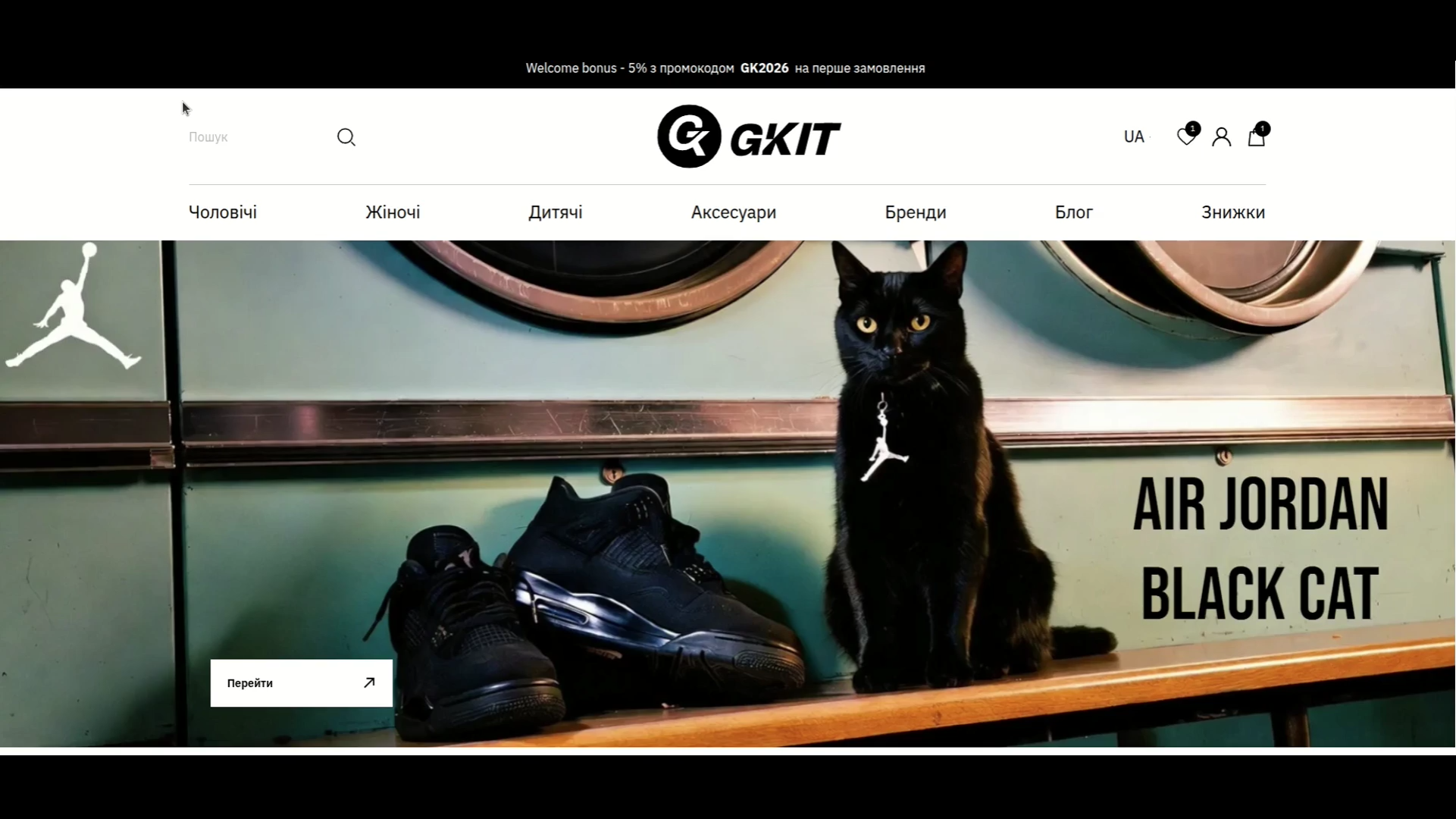


While the website was being developed, the client worked with our team on search engine optimization. You can view the initial results of this work during and immediately after the launch of the web project by following this link.
Website Development Work
The site was built on OpenCart. Once the project entered development, our developer analyzed the existing mockup and provided revisions that simplified the technical architecture and ensured correct display across all device types.
Missing UI elements (UI Gaps)
- Language switcher: the dropdown design was missing a visual state for when it is clicked - this needed to be designed.
- Header indicators: the Cart and Wishlist icons were not displaying item counts (numeric badges). These elements needed to be added so users could see how many items were saved without navigating to those pages.
- Product card: a review submission form was absent, while users needed the ability to leave feedback directly on the product page.
UX optimization suggestions
Reviews page:
- Layout change (grid): we proposed displaying reviews in a 3-column grid format, ensuring interface symmetry and easier text scanning.
- Content optimization: product images and direct links to the relevant products should be added to the review listing. This would help users quickly identify the item and proceed to purchase.
- Button management: we proposed removing the "Add Review" button from this page, as product cards were intended to be the primary place for submitting reviews.
The full package of proposals was submitted to the client for review and implementation. Next up was an interim audit of the updated mockup.
Current state of the site at the time of the audit
- Categorization: 3 base categories had been created in the system: Accessories, Clothing, and Footwear.
- Product card: all available product information was limited.
- Position duplication: identical products in different sizes were entered into the system as separate SKUs rather than as variations of a single model.
Optimization proposals
We proposed consolidating different sizes and specifica
We proposed consolidating different sizes and specifications of the same SKU into a single product card using the modifications feature. Benefits of this approach:
- Database cleanliness: avoiding the creation of a large number of duplicate entries for the same product.
- Inventory management: easier to track stock for a specific model across sizes and colors.
- User experience: within the product card (when synced with the site), customers can select the required size without navigating to separate pages.
This solution will reduce the number of redundant product entries and ensure cleaner imports going forward.
Since the site was planned to be populated through a CRM system (the client chose KeepinCRM), we focused on building the data architecture - developing the logic for product option automation and defining the input data sources. The resulting vision was submitted to the client for agreement on the integration tech stack.
1. Option automation (size and color)
It needed to be confirmed whether product options (Size, Color) would be created automatically in both languages. If so, the corresponding fields in each product card within the CRM would need to be filled in. These fields would then serve as the basis for generating modifications during import.
2. Required field mapping
The client needed to specify which fields in the CRM (or export file) should be used as the data source for the following parameters:
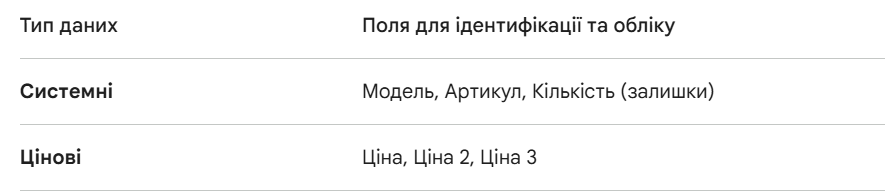
Filters such as Size and Color would be generated based on product options. For all other filters, corresponding fields also needed to be created in the CRM: Delivery, Type, Collection, Season, and Purpose. We recommended using dropdown lists with predefined values in the CRM rather than free-text input fields. This would standardize value selection and speed up product data entry.
Core system principle: the CRM serves as the central hub for inventory management and product data. We proposed the following logic.
1. Product updates (CRM → Site). All inventory management is handled exclusively within the CRM. The update process works as follows:
- Sync marker: a dedicated control element (dropdown or checkbox) is created within the product card in the CRM.
- Enabled: when changes are saved in the CRM, data is automatically pushed to the site.
- Disabled: changes in the CRM remain internal only — no sync with the site occurs.
- Data priority: the CRM takes precedence. If an administrator modifies product data directly in the site's admin panel, a discrepancy will arise. However, the next time that product is updated from the CRM side, the site data will be overwritten with the current information from the CRM.
2. Order creation (Site → CRM). Order processing works in the reverse direction to support operational tracking:
- Automatic creation: as soon as a customer places an order on the site, the system automatically generates a new order in the CRM.
- Data transfer: a complete data package is passed to the CRM:
- List of ordered items;
- Quantity and price;
- Customer contact details;
- Delivery and payment methods.
Next, we developed a technical data optimization plan for CRM-to-site synchronization.
1. Product grid restructuring (eliminating duplication)
The core issue was the creation of separate product cards for each size, which cluttered the database and complicated site-side filtering.
- Transition to a "Product + Variations" model: instead of 5 separate products (e.g. sneakers in sizes 40, 41, 42, 43, 44), a single parent model card is created. Sizes and colors are moved into modifications (SKUs) within that card.
- Consolidation logic: merge duplicates based on the "Model + Brand" attribute. This would allow customers on the site to see a single product card with a size dropdown - significantly improving UX.
2. Implementing required fields (multilingual)
For correct product display on the site, the following fields needed to be configured in the CRM:
Identification and logistics:
- SKU: unique identifier (required for inventory sync).
- Model: grouping name for consolidating modifications.
- Quantity: current stock level.
- Price / Price 2 / Price 3: (e.g. retail, wholesale, promotional).
| Field | UA (Ukrainian)) | RU (Russian) | Note |
| Product name | Required | Required | Clear name (e.g., "Running shoes") |
| Description | Required | Required | Detailed product text |
| Characteristics | Required | Required | Composition, material, seasonality, etc |
| Brand | Required | Required | Required for website filters to function |
3. Category work
The existing 3 categories (Accessories, Clothing, Footwear) are insufficient for quality SEO and navigation. We recommended creating subcategories (e.g. Clothing → Hoodies / T-Shirts / Pants), which would allow products to be automatically assigned to the correct site sections during import.
4. Implementation steps:
- Configure the "Parent Product — Modifications" relationship logic in the CRM (to be handled by the developer).
- Audit the database, merge duplicates into single model cards, and fill in missing language versions (particularly product names and descriptions) - content manager's responsibility.
- Determine whether all three price types (Price 1, 2, 3) should be exported to the site, or whether some are intended for internal CRM use only (to be decided by the client).
Technical requirements for Option and Filter fields in the CRM
1. Option generation logic. To display a single product card with selectable parameters on the site, rather than duplicate listings, automation based on specific CRM fields needed to be implemented.
- Automatic generation: we recommended creating options automatically during import.
- Required fields in the CRM:
- Size: numeric or alphabetic value (e.g. 42, XL, 38).
- Color (UA/RU): text field or reference list (e.g. Black / Чорний).
- Result: the system groups products by SKU/Model and converts the values from these fields into selectable buttons within the product card on the site.
2. Filter field structure. For site filters to function correctly, each attribute in the CRM must have a bilingual value. We recommended using "Dropdown" or "Multi-select" field types, as these eliminate input errors (for example, "Lviv", "lviv", and "Львів" would be treated as three distinct values if entered manually).
| Characteristic | CRM Field Type | UA (Ukrainian) | RU (Russian) |
| Availability | Dropdown list | e.g., "In stock" | e.g., "В наличии" |
| Type | Dropdown list | e.g., "Sneakers" | e.g., "Кроссовки" |
| Collection | Dropdown list | e.g., "Spring 2026" | e.g., "Весна 2026" |
| Season | Dropdown list | e.g., "Demi-season" | e.g., "Демисезон" |
| Purpose | Multi-select | e.g., "For sports" | e.g., "Для спорта" |
3. Benefits of list-based standardization
- Data integrity: no junk filters on the site caused by typos entered in the CRM.
- Content management efficiency: it is faster for staff to select a value from a list than to manually type text in two languages each time.
- SEO optimization: filters with consistent, clearly defined names are indexed more effectively by search engines.
A checkbox or dropdown also needed to be created in the CRM: "Update product on site?" This would allow control over whether a product should sync during save.
During CRM setup, several forward-looking questions arose, for which we provided recommendations.
1. Where to store data (original files). Uploading photos directly to the CRM is not ideal for high-load projects, as CRM databases are not optimized to store and efficiently serve large media files.
Recommendation:
- The CRM acts as the "brain": only text references (URLs) to images are stored within the product card.
- Cloud storage (e.g., S3 or bunny.net) acts as the "warehouse": original high-resolution files are stored there.
2. How it works across the chain: CRM → Site → Customer. The logic is as follows:
- A manager uploads a photo. A script automatically stores it and writes only the link to the CRM: https://cdn.yourdomain.com/products/image_123.jpg.
- The site retrieves product data (name, price) along with this link from the CRM via API.
- When a customer opens the page, their browser requests the image not from your server or site, but directly from the CDN.
3. Benefits of using a CDN (using bunny.net as an example). The client proposed using image optimization ("resizing"), which is critical for SEO and page speed:
- Adaptability: a single high-resolution image is uploaded, and the CDN serves a 400px version to mobile devices and a 1200px version to desktop monitors.
- Formats: automatic conversion to WebP or AVIF, reducing file size by 30–50% without quality loss.
- Speed: thanks to a global network of data centers (PoP), a customer in Kyiv receives the image from a server in Eastern Europe rather than from the US.
4. Risks and considerations. For the system to run reliably, the following must be taken into account:
- File naming consistency: files in storage must follow a clear structure or use IDs that correspond to product IDs in the CRM, to avoid confusion.
- Optimization costs: services like Bunny Optimizer or Cloudflare Images are typically paid (e.g. $1/month per zone + traffic fees). However, this is cheaper than losing customers due to a slow site.
- Fault tolerance: if the CDN goes down (which is rare), the site will be left without images. It is therefore important to configure proper browser-side caching.
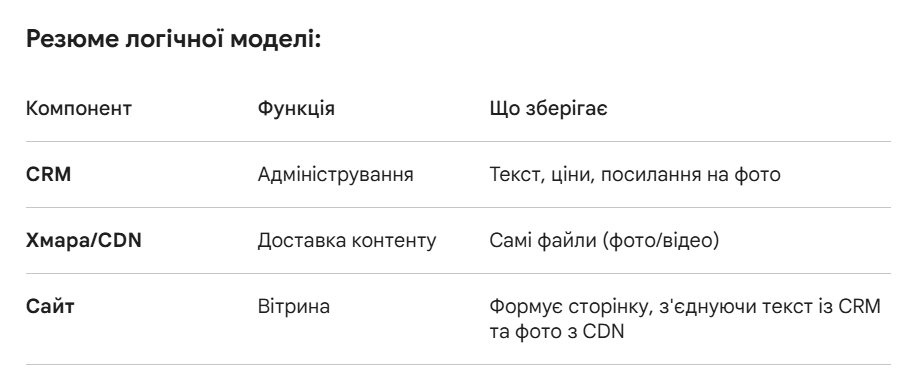
The provided recommendations were approved by the client but were not implemented due to a change in the project's business logic on the client's side.
The next step was to create and populate the required fields in the CRM. This work was handled by the client's team.
The following stage covered the specification of the required product card fields in the CRM.
For stable import and correct product display on the site (in both language versions), the following structure needs to be implemented:
1. Identification and inventory (system fields). These fields are critical for inventory and order synchronization.
- SKU: required - this is the unique product identifier. Without it, automatic price and quantity updates are not possible.
- Model: required - used for grouping variations (e.g. different colors of the same model).
- Quantity: required - current stock level must be known.
2. Pricing.
- Price (Retail): required (primary price displayed on the site).
- Price 2 / Price 3: optional (can be used for promotional prices, wholesale rates, or loyalty program tiers).
3. Content (Localization: UA / RU). To prevent empty pages on the site, these fields needed to be populated in both language versions.
- Product name: required.
- Description: required (for SEO and customer information).
- Specifications: required (material, size, composition, etc.).
- Brand: required (for site-side filtering).
We also recommended implementing a validation rule at the CRM level that would prevent a product card from being saved if the following fields were left empty: SKU, Price, Quantity, and Product Name (UA). This would protect the client from situations where a broken product — with no name or a zero price - gets pushed to the site.
*The display of additional price tiers (Price 2 and Price 3) was not implemented due to a revision of the project's commercial logic.
Option fields
It needed to be confirmed whether options (size, color) would be generated automatically. If so, the following fields need to be added to the CRM:
- Size
- Color (UA / RU)
Product options on the site are generated based on these fields.
Filter fields
For site filters to function correctly, the following fields need to be present in the CRM:
- Delivery
- Type
- Collection
- Season
- Purpose
All values needed to be specified in both languages. Important: we recommend using dropdown lists rather than free-text input. This standardizes the data and speeds up the workflow.
Data logic for product creation on the site:
- If the Brand (RU) field is empty, the value from the Brand field is used.
- If the Model field is empty, the value from the SKU field is used.
- If the Product Name (RU) field is empty, the value from the Product Name field is used.
- If the Description (RU) field is empty, the value from the Description (UA) field is used.
- Product specifications are populated based on the following fields: Type, Color, Collection, Season, Purpose.
- Filters are automatically generated based on specifications and options.
Additionally, we developed a module allowing the API key and other parameters to be configured.
Once the client had entered products into the CRM, we completed the technical integration between the site and CRM - fully automating the import of product catalog data and attributes (filters). For the next phase of work, we submitted an information request:
1. SEO data for filter pages (SEO-friendly URLs)
The following needed to be prepared for each filter page:
- H1 heading and URL.
- Meta tags: Title and Description.
- Content: category text description.
- Technical: list of activated filters for correct menu logic.
2. Contact information and service pages
- Contacts: phone numbers, email, social media links.
- FAQ: prepared answers to common customer questions.
- About us: page copy.
- Legal: Terms of Gift Certificate Use, Privacy Policy, and Public Offer Agreement.
3. Content marketing and social proof
- Blog: article writing (copy and visual design).
- Reviews: populating the site with general store reviews and individual product reviews.
Following the implementation of the provided data, the client conducted a final site audit and submitted a list of last-round revisions. These were promptly addressed by our team.
The project launched at the end of February. The client then moved on to SEO optimization services, where we focused on ensuring a smooth transition through the release. Our team conducted both pre-launch and post-launch reviews, following which the necessary technical improvements were carried out.